If you are new to PCB design, KiCad wins this altium vs kicad comparison for beginners on almost every practical measure. It costs nothing, runs on Windows, macOS and Linux, and its schematic, layout, 3D viewer and Gerber output are all good enough for a first board you actually fabricate. Altium Designer pulls ahead when a commercial project needs constraint-driven high-speed rules, native variant assemblies, team workspaces and vendor support. Both tools follow the same schematic-to-PCB workflow, so the skill you learn in one transfers to the other.
The honest answer also depends on what you are optimizing. A hobbyist with a laptop and a weekend is served well by KiCad’s zero-cost GPLv3 license. A hardware engineer joining a team that has standardised on Altium gets a much shorter ramp by staying with it. Below I walk through the decisions beginners actually face: cost, learning curve, libraries, features, support and what happens when you place a real order.
Table of Contents
- Altium vs KiCad Comparison for Beginners at a Glance
- Which Tool Has the Easier Learning Curve?
- How Do the Free and Paid Options Compare?
- What PCB Design Features Does Each Include?
- How Strong Are the Component Libraries?
- Which Tool Is Better for Simulation and Advanced Workflows?
- What About Collaboration, Support, and File Compatibility?
- What Should Beginners Look for in Their First PCB Project?
- Which Should You Choose?
- What Should You Test in an Altium vs KiCad Comparison?
- Frequently Asked Questions
- Is KiCad really free for beginners?
- Is Altium easier to learn than KiCad?
- Does Altium offer a free version or student license?
- Which tool is better for getting a PCB manufactured?
- Can beginners switch from KiCad to Altium later?
- Conclusion
Altium vs KiCad Comparison for Beginners at a Glance
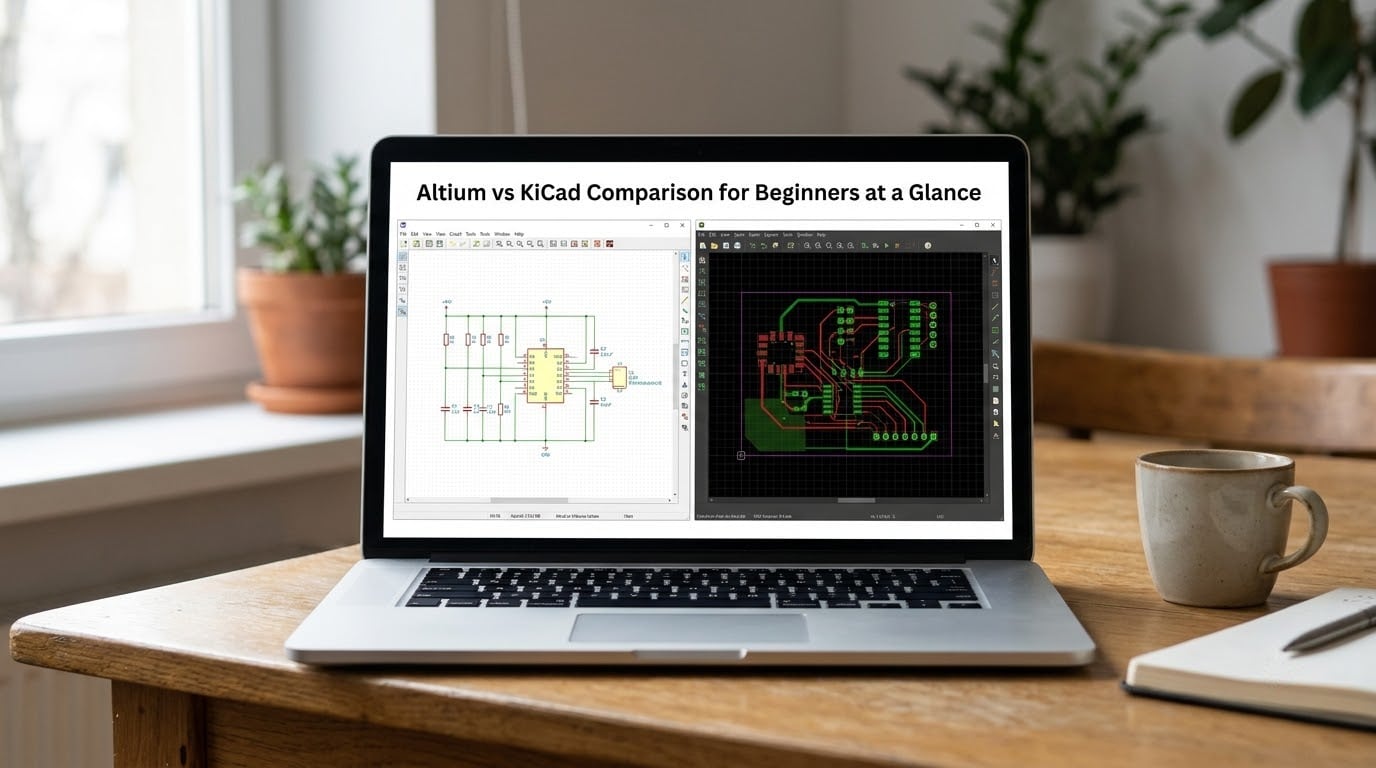
Here is the short version of how the two suites line up. The rows below are the ones that actually change a beginner’s day-to-day work.
| Criterion | Altium Designer | KiCad |
|---|---|---|
| Licensing model | Paid commercial license, sold as subscription or perpetual terms through the vendor | Free and open source under GPLv3, commercial use included |
| Operating systems | Windows | Windows, macOS, Linux |
| Learning curve | Steeper, deep nested menus and many options dialogs | Gentler, one focused window per task |
| Schematic capture | Full-featured, project-centric with electrical rule checking | Full-featured, standalone editor with ERC |
| PCB layout | Advanced constraint engine, rigid-flex, stackup by region | Strong single-board layout, net classes, length tuning |
| Component libraries | Vendor-managed content, part search, STEP 3D bodies | Official and community libraries, wizards, vendor search integrations |
| Simulation | Integrated SPICE plus optional signal and power integrity suites | Integrated SPICE via ngspice, no commercial integrity suite |
| Collaboration | Cloud workspaces, project history, integrated version control | Plain files that work well with Git, plugin-based extras |
| Support | Vendor support, live training, reseller network | Community forum, documentation, developer participation |
| File formats | Native Altium project, ASCII export, reads common foreign formats | Native KiCad project, reads Eagle, exports Altium ASCII |
| Best fit for beginners | Students on a free trial heading into an Altium workplace | Everyone else starting from zero |
Which Tool Has the Easier Learning Curve?
KiCad is easier to learn, mostly because of how it is organised. Each program does one job: a schematic editor, a PCB editor, a footprint editor, a 3D viewer and a symbol editor. There is no project tree to understand before you can place a resistor, and no ribbon full of greyed-out commands.
Altium rewards a structured workflow. Everything lives in one project document, and the interface exposes a large amount of power at once. That density is why experienced engineers like it, and why a beginner can lose an evening to a menu path. Long-time Altium users with decades of practice still describe the nested menu structure as the main thing that makes it slow to hand to a new hire.
Learning resources follow the same split. Altium publishes structured courses and live training aimed at getting an engineer productive inside an industry team. KiCad ships official getting-started material plus an active community forum where core developers show up and answer questions directly, which is the kind of access a paid vendor rarely offers.
One KiCad wrinkle worth knowing early: the native file format changed between major releases, so a project saved in one version may need a migration step in the next. Altium is more stable in that respect, though its projects are tied to the vendor’s format.
How Do the Free and Paid Options Compare?
KiCad is genuinely free. It is distributed under the GPLv3, which means you can use it for commercial products without paying anyone or asking permission. There is no seat count, no feature gate and no time limit, and the source code is public if you ever want to inspect how it behaves.
Altium Designer is a paid commercial product. Licenses come in subscription and perpetual forms, with pricing that depends on the edition, the number of seats and the term you buy, so check the vendor’s own store for current figures rather than trusting an old article. Altium also sells a reduced-feature edition for smaller teams and cloud workspaces that hold projects centrally, and the company offers trial and student access through its education program.
Neither tool is better simply because one costs more. A paid seat does not design a better two-layer board for a beginner, and it does not make the library search better on the first afternoon. What a paid license buys is workflow depth, constraint automation, collaboration tooling and someone to call.
There is a third option that confuses this comparison: CircuitMaker, the free cloud-based tool from the same vendor as Altium. It is genuinely usable for open designs, but it forces cloud storage, is Windows-only, and caps how many private projects you can keep, which is a real constraint once the board is not public.
What PCB Design Features Does Each Include?
Both suites cover the full beginner path: schematic capture, footprint assignment, board layout, design rule checking, 3D review and Gerber output. Neither one will hold you back on a first two-layer board with a microcontroller, a regulator and a handful of passives.
The difference shows up in constraint management. Altium lets you define stackups, impedance profiles and routing constraints that the layout engine enforces as you place tracks, which matters when a design carries differential pairs or length-matched buses. KiCad handles the same tasks through net classes, custom rules and length-tuning, and reviewers with long Altium experience point out that multi-select edits and relative paste positioning still feel less polished there.
Layer and via handling is comparable for ordinary boards. Altium goes further on rigid-flex designs, buried and blind via structures and stackup-by-region control, areas that rarely come up in hobby work but show up in consumer electronics. Recent KiCad releases also ship an integrated autorouter, which closes one of the most common complaints about the suite, though neither vendor expects an autorouter to beat a competent human on a real board.
Output generation is a wash. Both write Gerber, drill and pick-and-place files, both include a 3D viewer for checking part heights and enclosure clearance, and both can drive a design rule check before you send anything out. If you want the specifics of what that check actually catches, our guide to design rule checking explained for beginners walks through the failure modes in plain language.
How Strong Are the Component Libraries?
For a beginner, library quality matters more than library size. One wrong footprint means a board that has to be scrapped and reordered, and that cost dwarfs whatever time you saved by clicking through a larger catalogue.
KiCad ships official symbol, footprint and 3D model libraries, and both a symbol wizard and a footprint wizard that generate correct-looking parts from a datasheet pin list. Community libraries on GitHub fill the gaps, and several vendors offer direct integration for component search, which community reviewers single out as one of KiCad’s strongest practical features.
Altium’s library story is built around managed content and component search that reaches vendor databases and returns parts with parameters and STEP models attached. For a company that buys parts from a distributor every day, that connection is worth real time, and STEP-based 3D bodies give a more accurate mechanical check than simplified models.
Whichever way you go, verify rather than trust. Check pin numbering against the datasheet, confirm the courtyard or courtyard-equivalent keeps parts from colliding, and make sure the paste layers and assembly outlines are right before layout. If you take one habit from this comparison, make it that one.
Which Tool Is Better for Simulation and Advanced Workflows?
Altium is the stronger option once a project leaves the learning stage. Its integrated SPICE simulator, variant assemblies with alternate and do-not-populate parts, rigid-flex stackup control and optional signal and power integrity tools are built for production work, and the constraint system keeps rules consistent across a team.
KiCad has narrowed the gap considerably. SPICE simulation is integrated through ngspice, and length tuning and custom rules cover most high-speed routing needs for boards under about 100 MHz, where impedance control really starts to bite. The gaps that engineers still name are variants, which need a community plugin, panelization, which also relies on plugins rather than native tooling, and any in-tool Gerber editing.
That gap matters when the same board ships in four versions, or when the fab house asks for a panel rather than a single design. It rarely matters for a first board. If you are designing a board that sits next to an FPGA, our FPGA design flow guide for beginners covers the adjacent concerns like power, clocking and constraint planning that both tools need.
What About Collaboration, Support, and File Compatibility?
Collaboration is where Altium’s paid model earns its keep. Cloud workspaces keep a team’s projects, revisions and component data in one place with change history, and the vendor supports version control integration for teams that need it. KiCad projects are plain files and text-based history, which pairs naturally with Git, though the extra conveniences live in plugins and you have to set them up yourself.
Support runs the same direction. Altium gives you a support channel, live training and a reseller network you can escalate to. KiCad gives you documentation, a large forum and developers who read feature requests. For a beginner working alone, that community access is arguably the more useful of the two, and for a company it is not close.
File exchange is less of a barrier than it used to be. Both tools read common third-party formats to some degree, KiCad can import Eagle projects, and Altium can import KiCad files. But the real answer to file compatibility is simpler: a fabricator only needs your Gerber and drill files, and both tools produce them. Get the rules right, order the board, and the editor you used stops mattering the moment you upload the package.
What Should Beginners Look for in Their First PCB Project?
The best way to answer this comparison is to picture one small board end to end. Here is the sequence every beginner walks, with where each tool helps and where it trips you up.
- Install and project setup. KiCad installs on all three major operating systems with no account. Altium installs on Windows and pushes you toward a signed-in workspace or a local project structure worth learning first.
- Schematic entry. Both capture nets cleanly and run electrical rule checks. Altium’s project-centric approach pays off when the schematic grows past a few dozen parts.
- Footprint assignment. This is where mistakes hide. Assign a footprint that does not match the physical part and no amount of careful layout will save the board.
- Board outline and stackup. Two to four layers is the beginner norm. Set the stackup before routing, because impedance calculations depend on it.
- Placement and routing. KiCad pushes you to place manually, which teaches you something. Altium’s shove and drag routing saves time once you know the interface.
- Design rule check. Run it, read every error, fix it, run it again. Both tools let a warning through if you tell them to, which is how bad boards reach a fabricator.
- 3D review. Look for parts sticking through an enclosure and for silkscreen that lands on a pad.
- Gerber and drill export. Both export these directly, and both let you preview them before upload. Preview every time.
- Fabricator handoff. Read the fab notes, add the stackup and any impedance requirements, and check the assembly drawings yourself. Fabricators do not debug your design files.
Notice that nine of those steps are identical in both tools. The tool choice changes how pleasant they are, not whether you can finish them.
Which Should You Choose?

In this altium vs kicad comparison for beginners, most of the difference comes down to one question: do you need the professional workflow features before you have shipped a board? If not, the free path wins on every practical measure.
Pick KiCad if you are a student, a hobbyist, or anyone whose computer might be a Mac or a Linux laptop. It is the right default for a first board because the cost of trying it is zero and the tools are good enough that you will not hit a wall. Pick Altium when the job needs professional workflows and team support, or when you are moving into a workplace that already runs it. That is usually the strongest argument for Altium, and it is a career argument rather than a feature argument.
A few profiles that make the decision easy. If you plan to ship a commercial product, KiCad’s license removes a line item from your budget, and small business owners who made that switch report no regret, though you lose variant assemblies and vendor support. If you design high-speed, RF or multi-layer dense boards, Altium’s constraint engine earns its price. If you work with a team, match whatever they already use rather than maintaining two toolchains.
What Should You Test in an Altium vs KiCad Comparison?
Install both and design the same small board twice. Time the setup, the library work, the routing, the rule check and the manufacturing export in each. The honest answer is that the difference shows up in hour three, not in hour one, and the tool that frustrates you less is the one you will still be using a year from now. If your test board comes out clean in both, the decision stops being technical.
Frequently Asked Questions
Is KiCad really free for beginners?
Yes. KiCad is released under the GPLv3 open source license, which means the full suite, including the schematic editor, PCB editor, 3D viewer and library tools, costs nothing to download and nothing to use. The license also permits commercial use, so selling a board you designed in it raises no licensing question. The only cost is a donation if you feel like giving one back.
Is Altium easier to learn than KiCad?
No, though experienced Altium users will get further faster once they learn it. Altium puts a large amount of functionality in front of you at once, with nested menus, many options dialogs and a project structure worth understanding properly. KiCad splits the work into small single-purpose programs, so a beginner can place a component in the first hour. Altium rewards structure, KiCad rewards curiosity.
Does Altium offer a free version or student license?
Altium Designer itself is a paid product, with subscription and perpetual license terms and different editions at different feature levels. What it does offer is access through trial periods and a student program that gives learners access to the paid tools through participating institutions or direct application. There is also CircuitMaker, a free cloud-based editor from the same company, but it forces cloud storage, runs only on Windows and limits how many private projects you can keep.
Which tool is better for getting a PCB manufactured?
Neither, as long as your design is clean. A fabricator only needs your Gerber, drill and pick-and-place files, and both tools export those directly with a preview before upload. What actually decides whether a board works is whether the footprints match the real parts, the design rule check passes, and you followed the fabricator’s notes. Read our design rule checking guide if that last mile feels unfamiliar.
Can beginners switch from KiCad to Altium later?
Yes, and it is a normal career path. The schematic-to-PCB workflow, net classes, ground planes and Gerber output work the same way in both tools, so most of what you learn transfers. The concepts that take relearning are the constraint system, variant assemblies and library management. If you want a head start, design one small board in KiCad, then repeat it in Altium and note which steps felt easier for you.
Conclusion
For a beginner in 2026, KiCad is the right first tool: free for personal and commercial work, available on every operating system, and good enough to take a real board to a fabricator. Altium Designer becomes the better choice when team workflows, constraint-driven high-speed rules, variant assemblies or vendor support start to matter, which usually happens with a job rather than with a hobby.
Do the practical thing: download KiCad and finish one small project this month. If you are heading into an environment that runs Altium, use a trial period to build the same board a second time and compare the two workflows side by side.